How to Use PresenterPrep: A Founder's Walkthrough
Most founders spend their last week before a raise in the wrong place: inside Figma, swapping fonts on slide 7, adjusting the gradient on the title card, rewriting the market-size line for the fifth time. Then they walk into the meeting having said the pitch out loud maybe twice — both times alone, both times without a clock — and wonder why investors didn’t lean in.
The deck is a script. The pitch is a performance, and investors fund the performance. Your delivery, your pacing, the confidence in your voice when you hit the traction slide — that’s what gets remembered after they close the deck. A beautiful PDF that’s delivered shakily loses to an ordinary deck that’s delivered with conviction. Every time.
PresenterPrep is built around that single belief: founders need a way to practice the delivery — privately, on their own time — not just polish the artifact. Here’s how to use it.
1. Upload your deck
You’ve read your own deck so many times you can’t see its gaps anymore — but an investor will, in the first 30 seconds. The market-size logic that feels airtight to you because you wrote it six weeks ago looks hand-wavy to someone seeing it cold. The “why now” slide you keep meaning to fix is still missing. The team slide is doing 90% of the work the traction slide should be doing.
Drop the PDF in and you get a slide-by-slide critique: what’s missing, what’s weak, what’s burying your story, and where the investor is going to ask the question you don’t want. It’s the read-through you’d get from a partner at a top fund if they owed you a favor — except you don’t have to know one, and you get it before you ever sit down across from them.
Fix the obvious gaps before you start rehearsing. There’s no point practicing a pitch that has a hole in slide 4.
2. Practice out loud
Reading your slides in your head isn’t rehearsing. Mouthing the words while you scroll isn’t rehearsing. The first time you hear yourself pitch shouldn’t be in front of a check-writer.
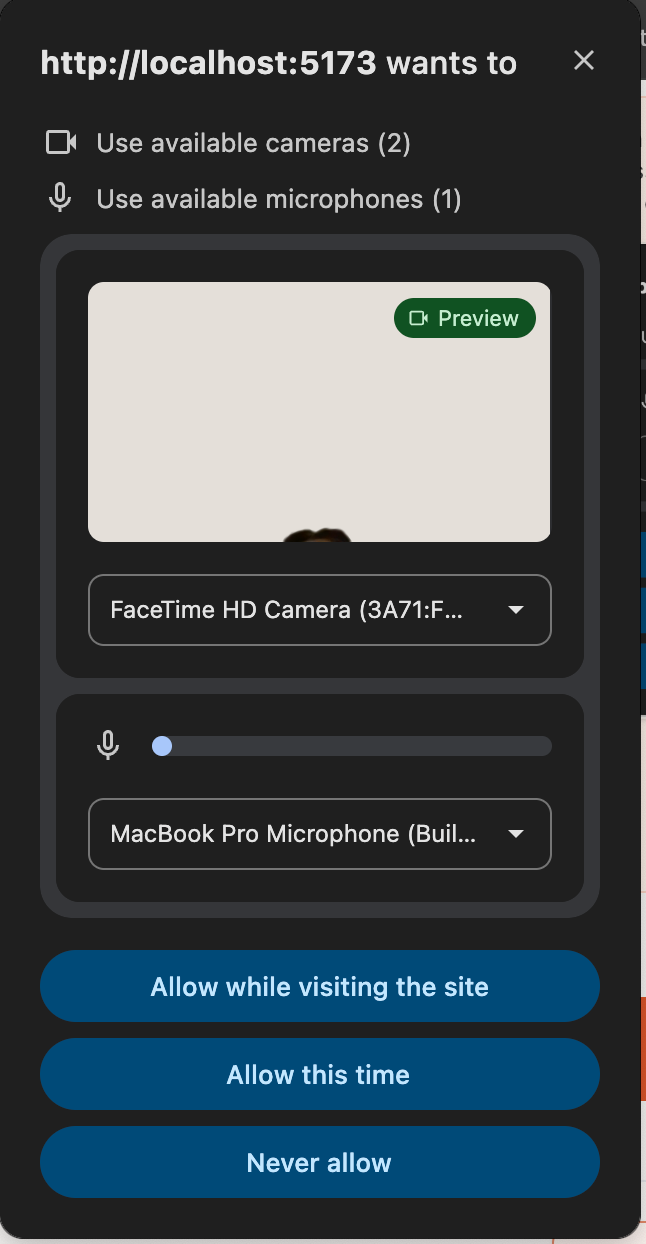
When you press Start Practicing, your browser asks for microphone and camera access in one prompt. Choose Allow — the mic goes live; the camera stays off until you turn it on with the camera icon in the practice header. Nothing is recorded until you actually begin a take, and you can stop at any time.
Run the pitch out loud with the voice AI coach. It listens to you, drives the slides on command — “next,” “go back to traction,” “stay on the team slide” — and pushes back in real time the way an investor would. When you get to the competition slide and wave it off, it asks what you’d do if Stripe shipped your feature next quarter. When the market-size math doesn’t quite add up, it asks where the bottom-up number actually comes from. When you ramble through the problem for ninety seconds, it tells you so.
Every run is recorded. Save multiple takes — your cold first attempt, the version after you’ve fixed the timing, the one where you finally nailed the founder story — and you can play them back side by side. Hear what improved. Hear what’s still flat.
Then share the recordings. Send your strongest take to a co-founder, a mentor, the advisor who actually fundraised last quarter — three people who’ll give you real feedback. They watch on their own time, leave timestamped notes, and you get five takes worth of critique in a week instead of begging one person for a Zoom slot. The compounding feedback is the point. Most founders never run the pitch in front of more than two people before they’re in the room with the actual investor. With PresenterPrep you can run it past ten without burning ten calendars.
3. Share with investors
A PDF can’t pitch for you. Investors skim it between meetings, scan the title and traction slides, and move on to the next one in the inbox. The version of you that lives in their head after that is your slides — not you.
When you’ve got a take you’re proud of, send your deck and your strongest recorded run as one link. Now when an investor opens it, they hear the founder and see the slides — the conviction, the pacing, the way you handle the question on slide 6 — not just the screenshot version of your company.
This matters most for the meetings you can’t get. The fund that ghosted, the partner who’s slammed all month, the angel who said “send me something.” A link they can watch in seven minutes at 1.25x speed gets a yes-or-no decision faster than a deck-only email ever will — and if the answer is yes, the next meeting starts already warm.
Why not just Zoom or Loom?
You can absolutely rehearse on Zoom or Loom. We’ve written guides for both — Zoom, Google Meet, Loom — and if those are what you have open, use them. They’re free, they work, and a recorded run is always better than no run.
But they’re recorders, not coaches. Zoom won’t tell you the team slide ran long. Loom won’t ask you the hard “why now” question when you skim past it. Neither of them watches your delivery and tells you that your voice went up at the end of every sentence on the ask slide, or that you said “um” eleven times in the first ninety seconds, or that the traction slide — the one that should be the most confident moment of the pitch — was the one where you sounded least sure.
A rehearsal without feedback is just repetition. Repetition makes you fluent in your current version of the pitch — including all its current weak spots. What you actually need is a coach in the room — someone who interrupts, pushes back, and tells you what to fix before the next run. That’s the thing a recording tool fundamentally can’t do, and it’s the thing PresenterPrep does.
Start with one pitch
You don’t have to commit to a system. Upload the deck you’re working on right now. Get the critique. Run the pitch out loud once. See what falls out.
If you walk away from that first session knowing one specific thing about your pitch you didn’t know thirty minutes ago, the loop is working. Do it again tomorrow. By the end of the week your delivery will be unrecognizable from where it started — and you’ll walk into the next investor meeting as the founder who actually rehearsed, not the one who kept tweaking slide 7.